Order, record the bill, pay it. Catch the fake bank details first.
Raise a purchase order and email it to the vendor. When their invoice comes, upload it and CentelAI fills in the form. Centel checks it against what you already know, and paying it takes one click.
What changes with Centel
Upload it, don't type it
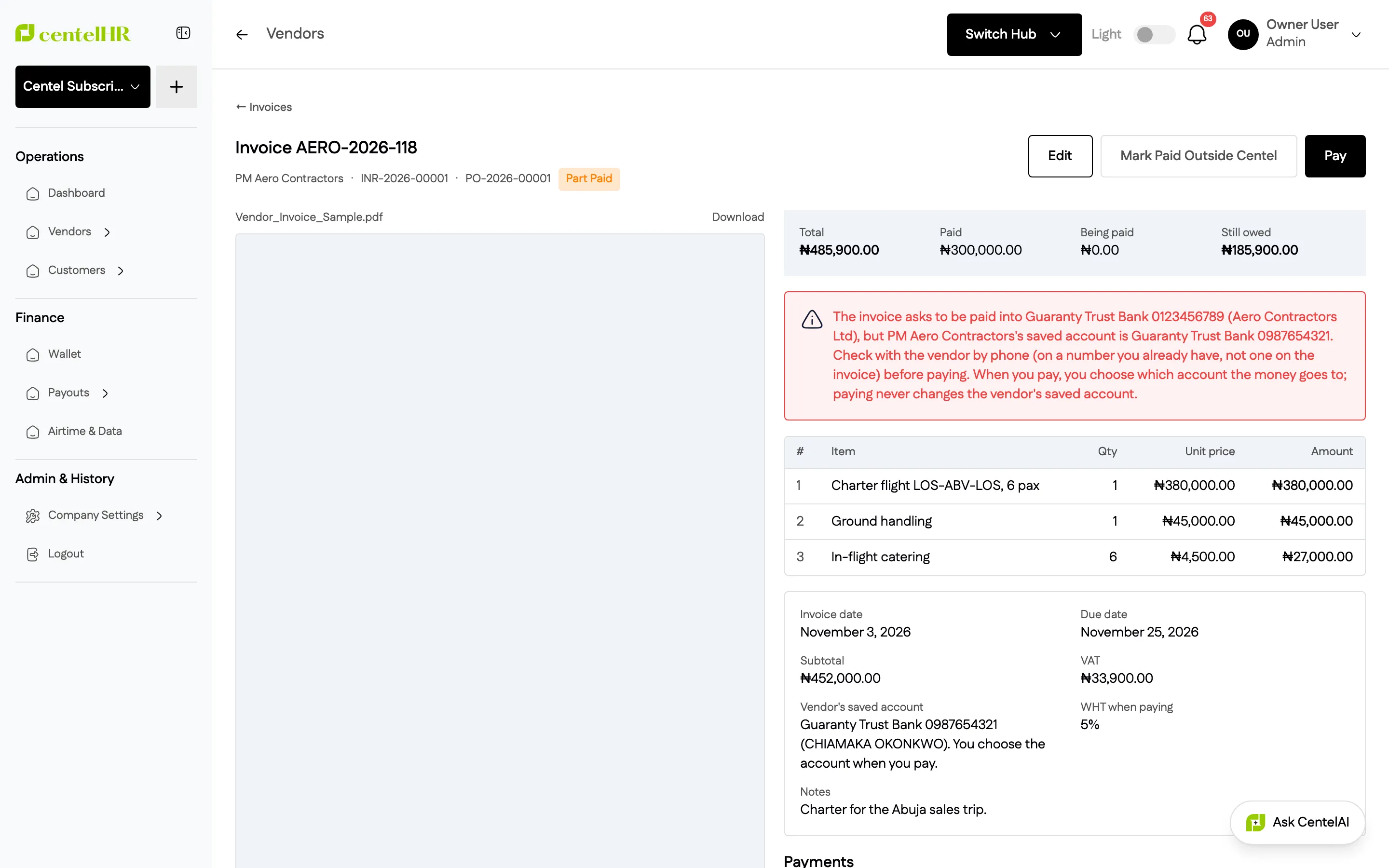
Upload the invoice as a PDF or photo. CentelAI reads the invoice number, dates, totals, VAT and line items. You check every field it filled before anything is saved.
The "our bank details have changed" scam, caught
If an invoice asks to be paid into a different account from the vendor's saved one, you see a red warning, and so do your approvers.
No invoice paid twice
The same invoice number can't be recorded twice for a vendor, and Centel never lets payments on an invoice add up to more than it's owed.
Vendors' sums checked
Line items that don't multiply out, items that don't add up to the subtotal, and invoices bigger than their purchase order are all flagged.
Pay in full or in parts
Pay opens with the vendor, the amount still owed, their WHT rate and the invoice number filled in. Lower it to pay part now.
Reminded before it's late
Centel reminds your team in the app three days before an invoice is due, and once when it's overdue.
How it works
- 1 · Raise a purchase order
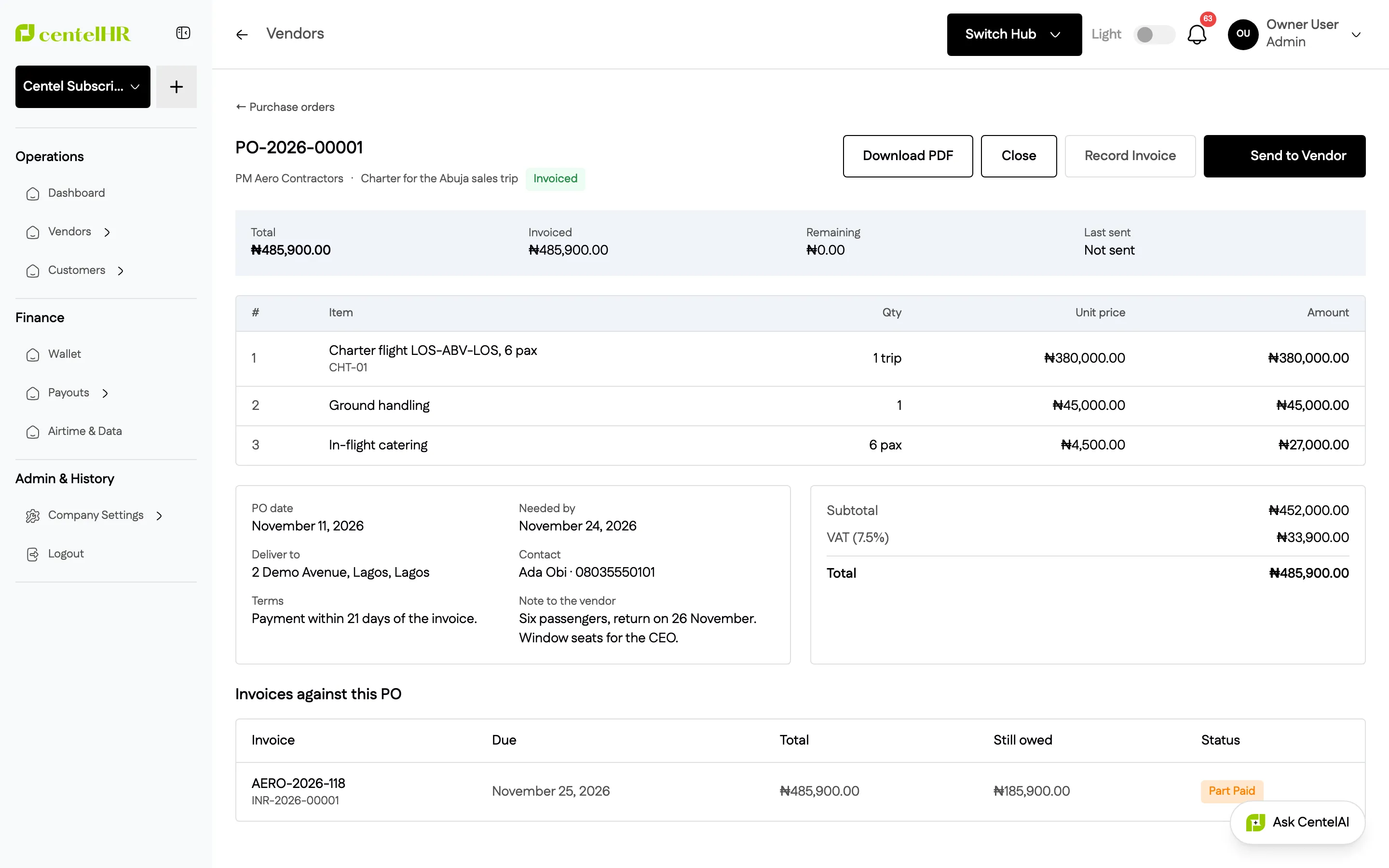
Items, VAT, shipping, discount and when you need it. Issue it to give it a number and lock it.
- 2 · Send it
Email the PO to the vendor as a PDF, or download it to print. It asks the vendor to quote the PO number on their invoice.
- 3 · Record their invoice
Upload the file and link the PO. CentelAI fills in the form and Centel shows any checks that need your eye.
- 4 · Pay it
One click opens the payment, which goes through your approvals like any vendor payment. Paid from your own bank? Mark it paid outside Centel.
In detail
Purchase orders move from draft to issued (numbered, for example PO-2026-00012, and locked), then to partly invoiced or invoiced as invoices are recorded against them, and finally to closed. A PO with no invoices yet can be cancelled. The PDF never shows bank details.
Invoices received are saved only when you press Save. Until then CentelAI’s reading is a suggestion. The file stays private to people with the Vendors Management permission. An invoice can be cancelled while nothing has been paid on it.
Checks before you save: a bank account different from the vendor’s saved one, an invoice number already recorded for that vendor, a vendor name that doesn’t match, a file uploaded before, a PO that belongs to someone else or doesn’t cover the amount, a due date before the invoice date, and sums that don’t add up.
Purchase orders and bills: common questions
Does reading invoices need the HR subscription?
No. It uses your company's CentelAI artifacts. With none left, you fill in the form yourself.
Can I choose which account an invoice is paid into?
Yes. The vendor's saved account is the default. You can also pay into the account on the invoice, or another account, after the bank confirms its name. Anything other than the saved account warns you and alerts your approvers. Paying never changes the vendor's saved account.
Do purchase orders need approval?
No. A purchase order moves no money. The money is approved when you pay the invoice.
Do I need a purchase order to record an invoice?
No. Linking a PO is optional.
Can I change an issued purchase order?
No. Issuing locks it. Cancel it and raise a new one, or close it when you expect nothing more against it.
Does Centel match an invoice to the PO line by line?
No. It compares the totals and warns when an invoice is more than what's left on the PO.
Related
Make next month-end the easy one.
Bring your team in from a spreadsheet and see your first payroll before you pay for anything.